SMILEVISION
Initialising imaging engine000%

X-ray vision for the modern dentist.

SmileVision reads panoramics, cephalograms, CBCT scans and intra-oral photos the moment you upload them. It numbers the teeth, flags findings and traces landmarks in seconds, and you stay in charge of every call.

One plan · Every studio · Billed in USD

At the end of a long clinic day the eye gets tired. The scan doesn't change. SmileVision reads every image with you, tooth by tooth and landmark by landmark, and shows its working. The final call is always yours.

< 4 sOPG findings plus tooth chart, timed end-to-end on our live GPU
1.0 mmmean ceph landmark error on held-out films
29cephalometric landmarks traced on every film
8imaging studios behind one login

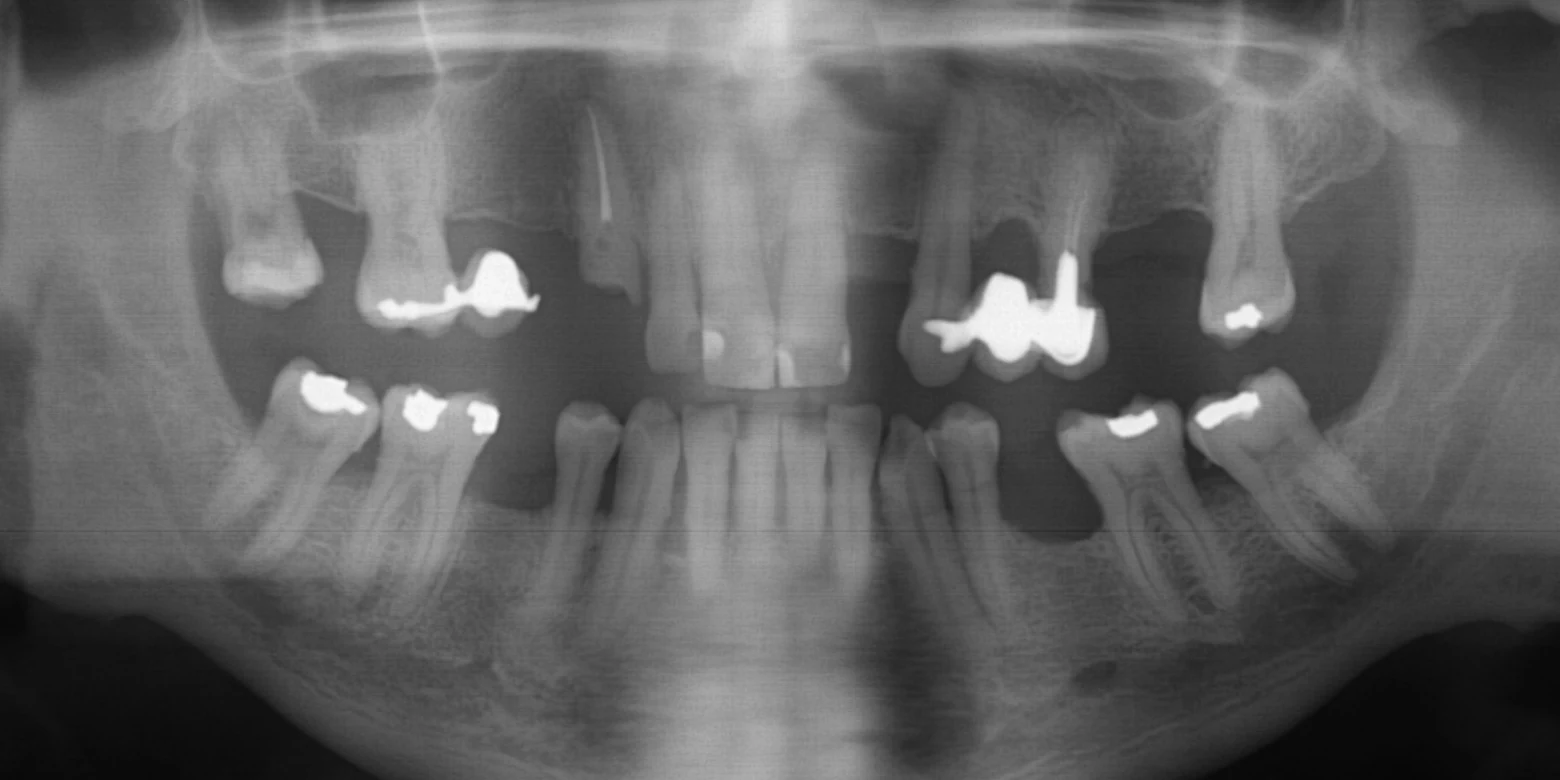
01 Panoramic X-ray

Every tooth numbered. Every finding flagged.

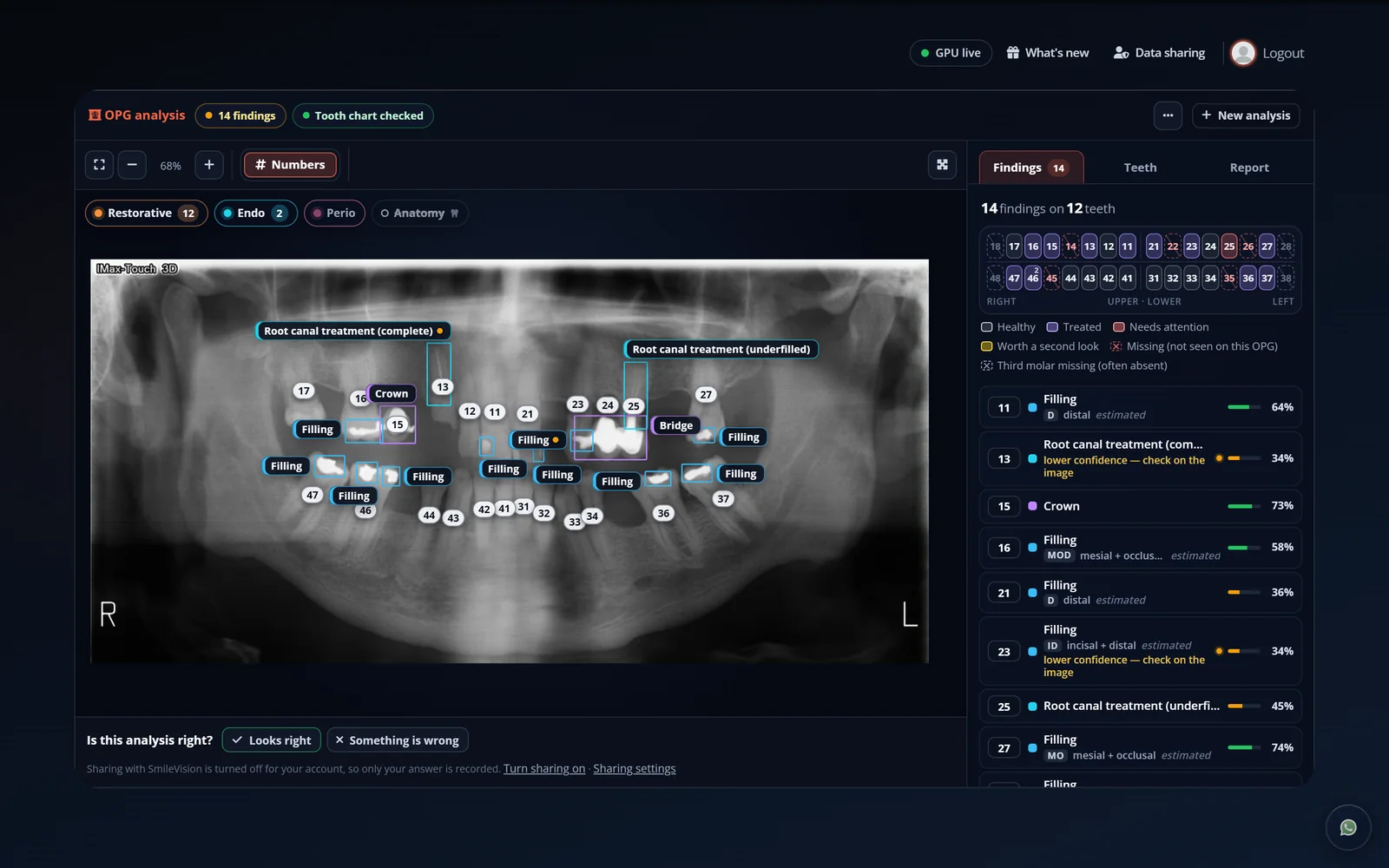
Drop in an OPG and SmileVision maps the dentition in FDI notation, then marks fillings, crowns, bridges, root canals, caries, periapical lesions, impactions and implants on the exact tooth they belong to.

    OPG · FDI notation · hover to inspectStandby
    Panoramic X-ray with SmileVision's tooth numbers and findings drawn on top
    Unedited SmileVision output. Findings at ≥ 33 % confidence. Decision support: you confirm every finding.

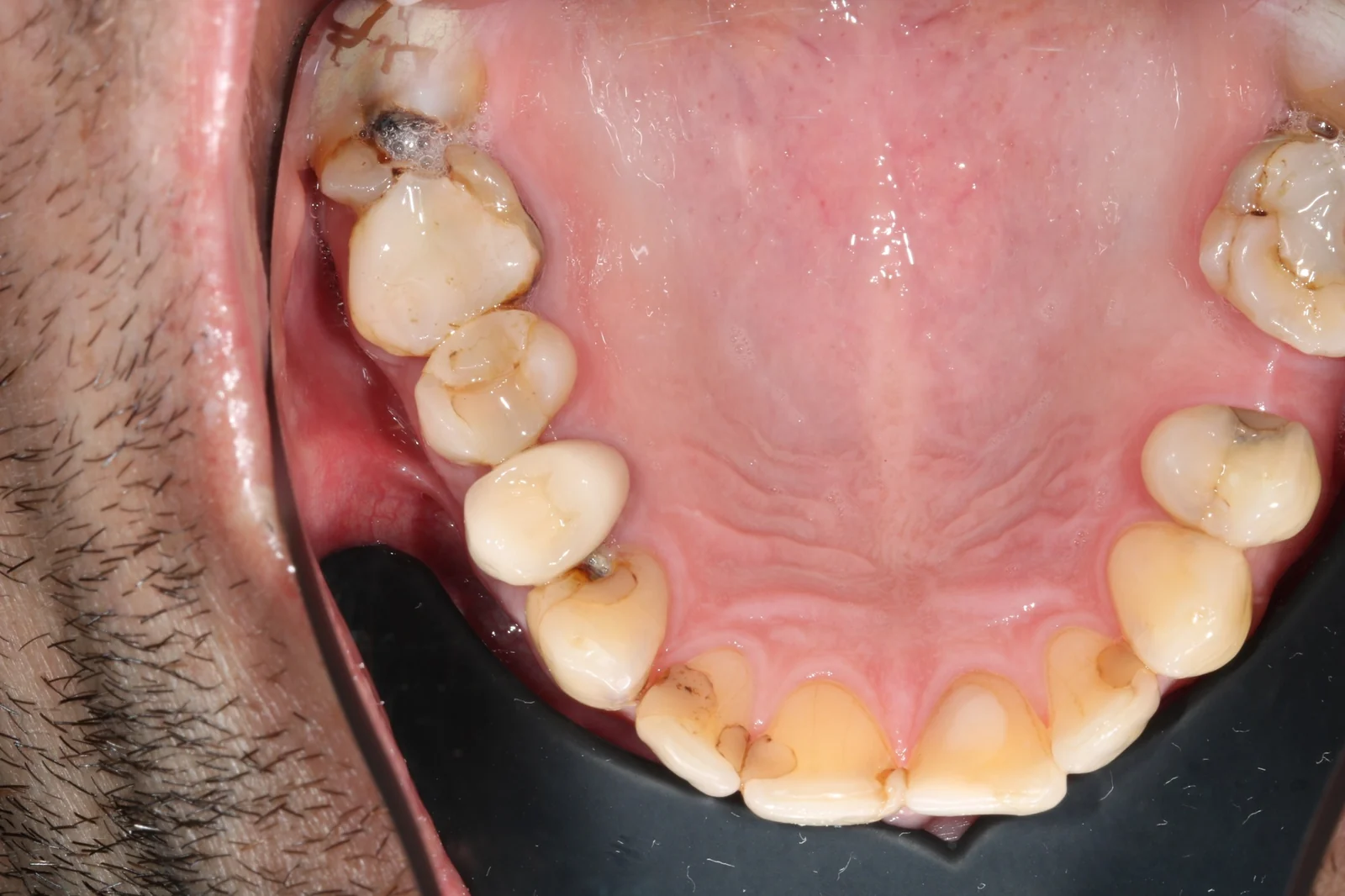
    02 Intra-oral photos

    Show patients what you see.

    Snap an intra-oral photo and SmileVision outlines calculus, caries, stain, deep fissures and existing fillings. Patients get the picture at a glance. Pair it with an OPG and the findings combine per tooth Beta.

    Hover the photo to inspect →

    Intra-oral · occlusal8 findings
    Upper occlusal intra-oral photo with SmileVision's findings outlined
    Unedited SmileVision output on an intra-oral photo.

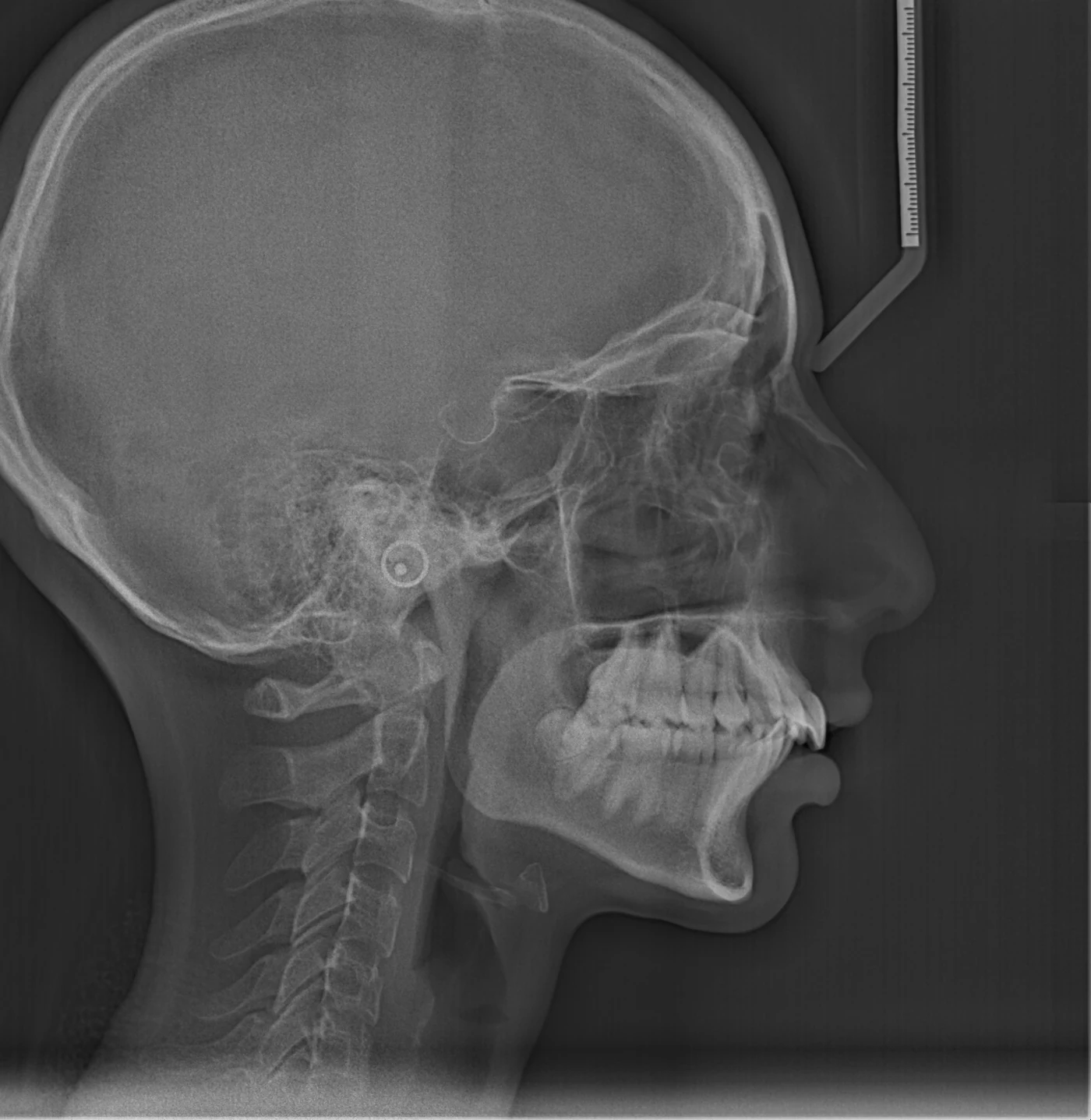
    03 Cephalometrics

    29 landmarks, traced before you find your ruler.

    Upload a lateral ceph and SmileVision places 29 landmarks, draws the tracing and runs Steiner, Downs, Tweed, McNamara, Wits, Jarabak and more against the population norms you choose. Every point stays draggable and every value updates live.

    1.03mm

    mean landmark error against senior orthodontists on this unseen film · 88 % of landmarks within 2 mm

    Lateral ceph · 0.139 mm/px0 / 29 landmarks
    Lateral cephalogram with SmileVision's landmark tracing
    A film the AI never saw in training. Landmarks, tracing and values are SmileVision's own output.

    04 CBCT

    Your CBCT, in three dimensions. In one click.

    4.1 · Segmented

    Bone, teeth and nerve, pulled apart for you.

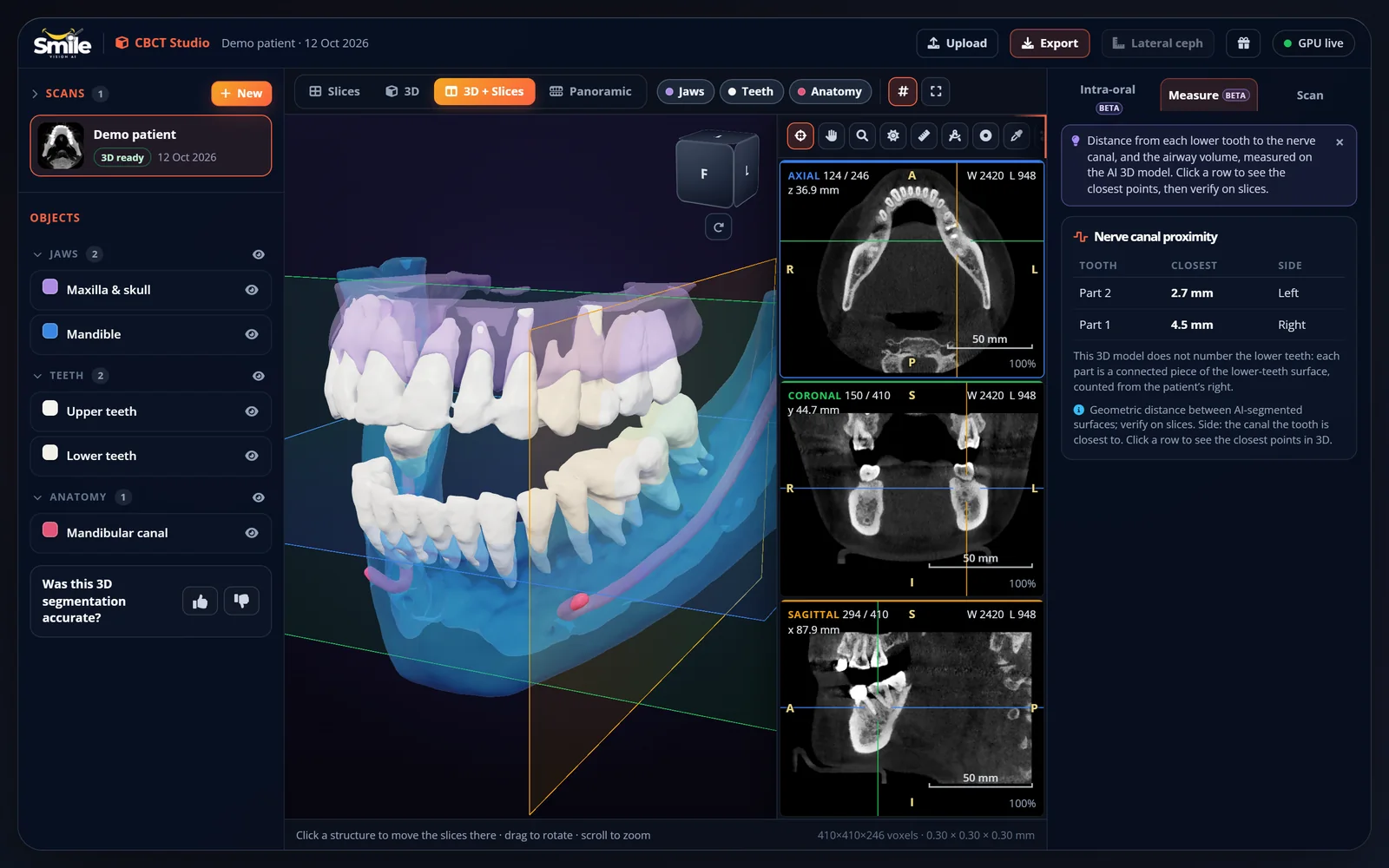
    The maxilla, mandible, upper and lower dentition and the mandibular canals are separated automatically and rendered in 3D, right in the browser, in about a minute. Every tooth gets its FDI number too Beta, and you can renumber any of them.
    4.2 · Sliced

    Every plane, any depth.

    Scroll axial, coronal and sagittal slices with a 3D localizer, or build a panoramic straight from the volume and send it to OPG analysis.

    4.3 · Measured

    Plan with the nerve in view.

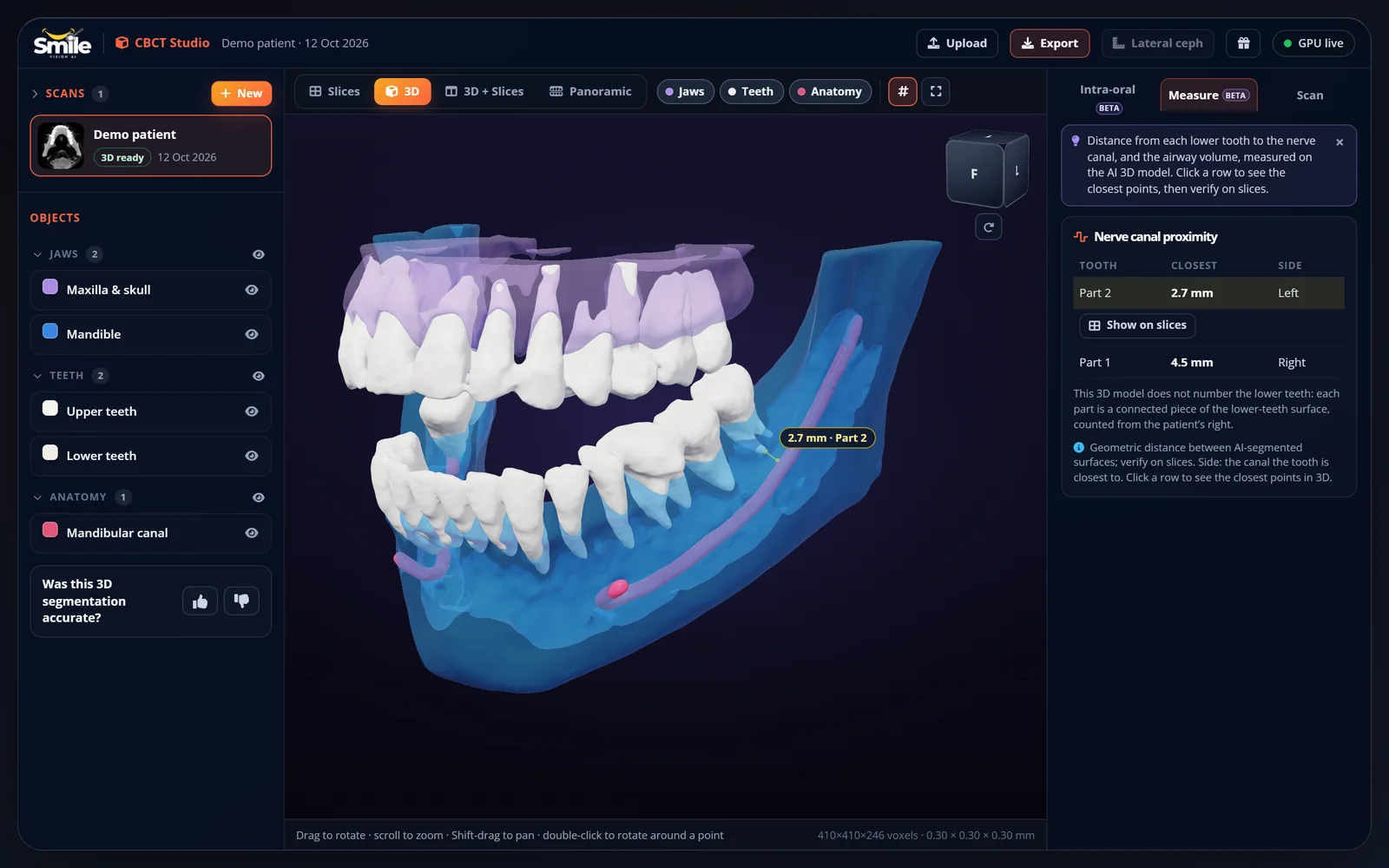
    Check canal proximity and airway volume, measure, plan implants by hand, overlay an intra-oral scan, and export STL or PLY for your lab.

    Segmented by SmileVision and rendered live in your browser.

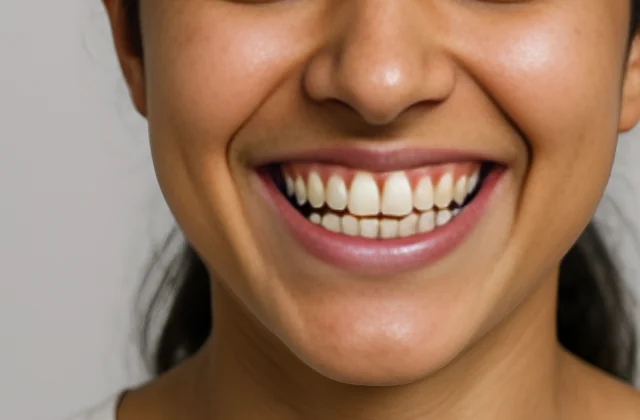
    05 Smile Studio

    Let patients see their new smile.

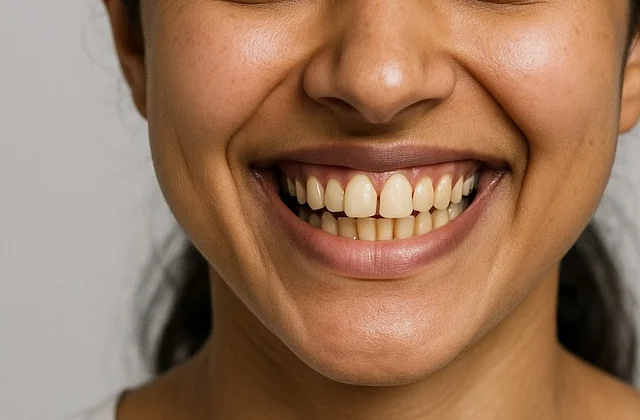
    Upload a frontal smile photo and the AI smile design starts by itself: a straighter, brighter smile in seconds, right beside the original. Add a whitening preview, measure the midline, smile arc, cant, gum display and incisor proportions against their published references, and print a one-page smile report for your patient.

    It's a simulation to start the conversation, not a promise of the treatment result.

    Drag across the photo to compare →

    Smile Studio · frontal smile photoExample 1 of 3
    The same smile after SmileVision's AI smile simulation: straighter, whiter teeth
    Original smile photo with yellowed, uneven teeth
    Original AI simulation
    These faces are AI-generated, so no real patient is shown. Each simulation is SmileVision's own output for that photo, only cropped to the smile.

    06 Novel Crown

    Print the temporary crown before you prep.

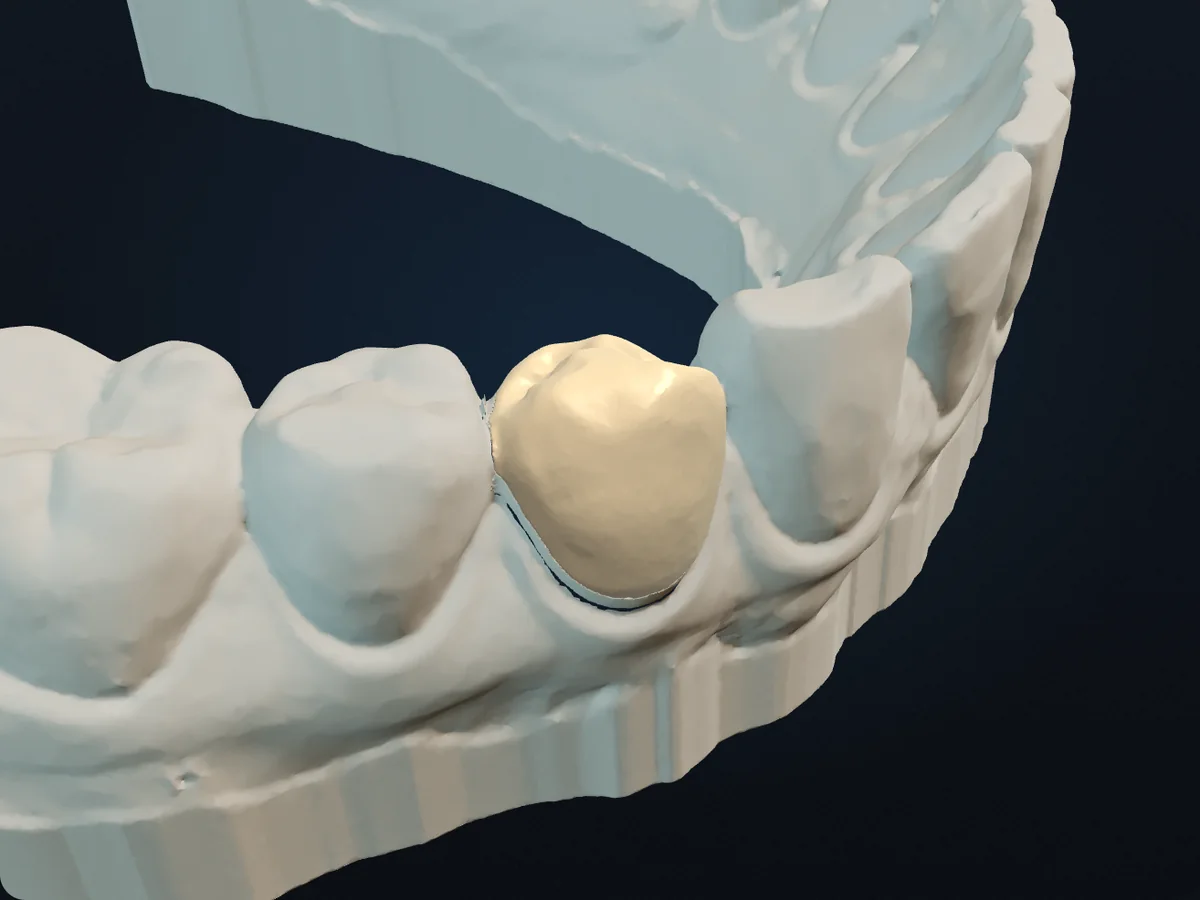
    Click the tooth on the pre-op intra-oral scan. The AI finds the tooth and the gum line, and Novel Crown Beta copies the tooth exactly as scanned, hollowed out by the reduction you choose and ending 1–2 mm above the gum. Print it, reduce the tooth to match, and the crown slips on like a sleeve.

    The crown's shape is computed from your scan, not generated by AI. Every design comes with its own checks, such as wall thickness and retention. It is in beta, so check the fit before clinical use. Already prepared? A second mode designs the temporary from the preparation scan.

    Drag the model to turn it →

    Novel Crown · 3D scanLower arch
    Temporary crown designed by Novel Crown, seated on a prepared lower premolar on an intra-oral scan
    An openly licensed intra-oral scan with the temporary crown Novel Crown designed for the lower right first premolar (tooth 44), rendered live in your browser.

    07 The platform

    Real screens. Real results.

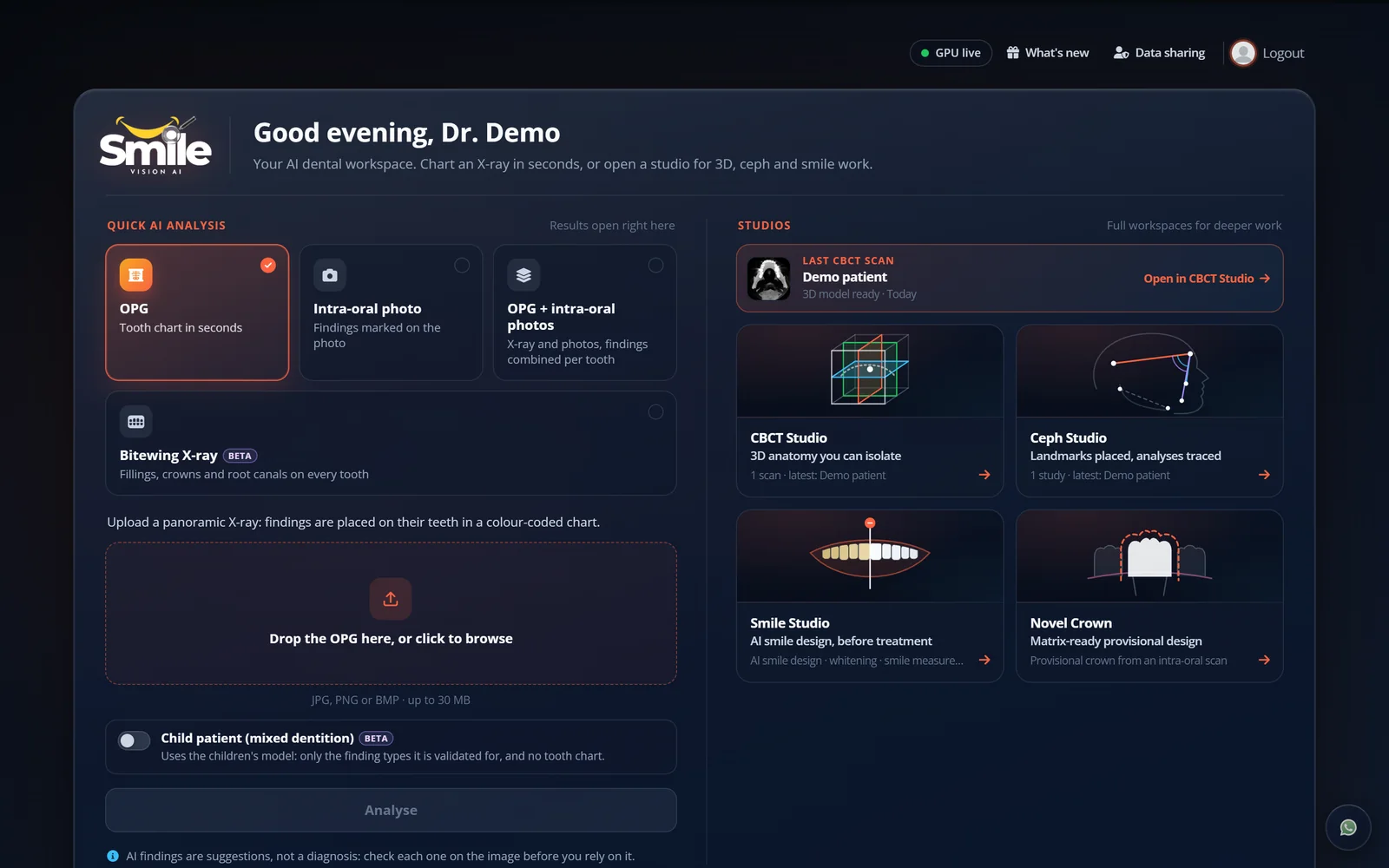
    Every screenshot below is SmileVision itself, running the same AI on the same public images you just scrolled through.

    The SmileVision dashboard with every studio
    01

    Your dashboard

    Every studio one click from home: OPG, photos, bitewing, ceph, CBCT, smile and crown.

    OPG analysis screen with 14 findings on the film
    02

    OPG analysis

    14 findings on 12 teeth, each pinned to its tooth with a confidence score.

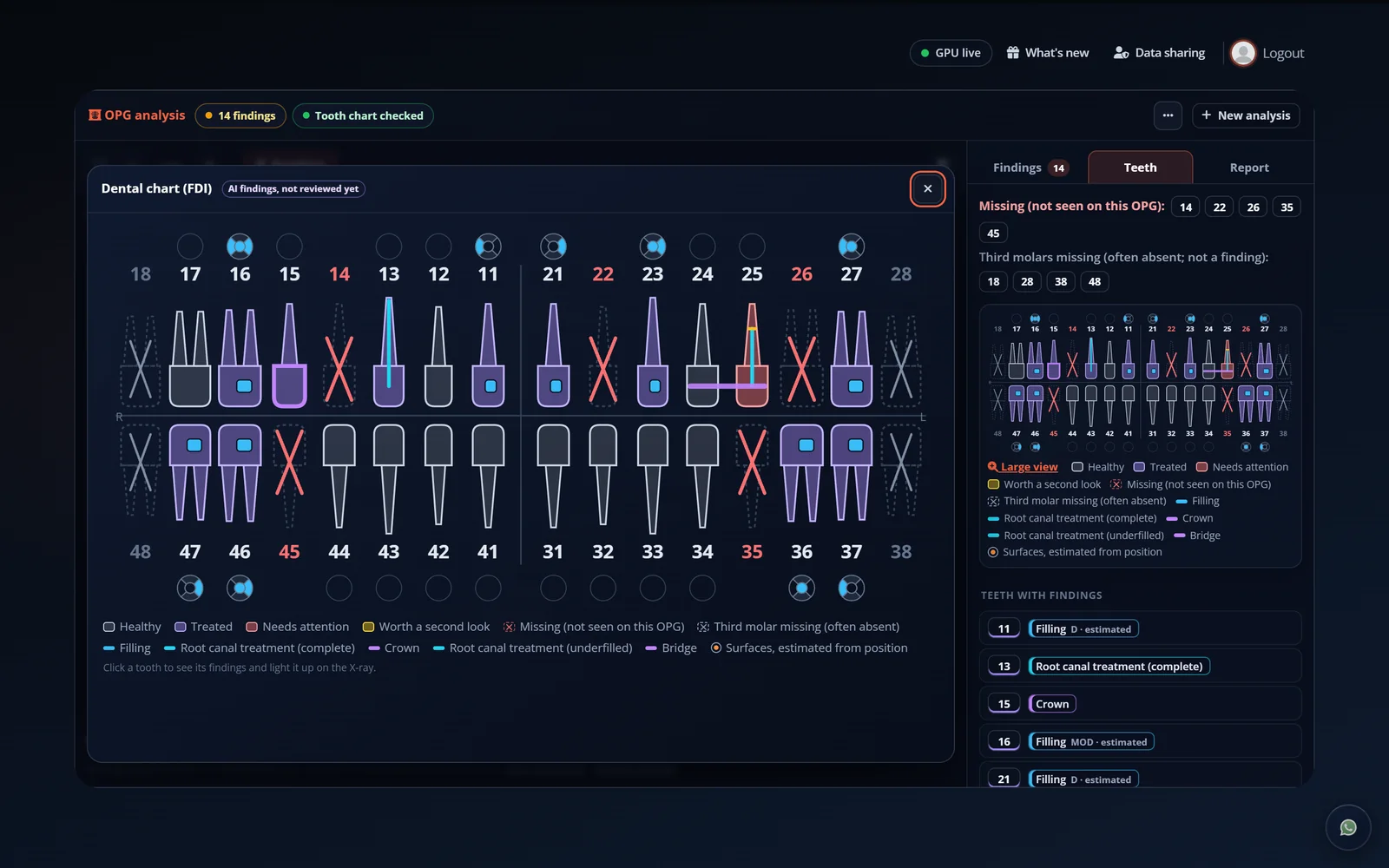
    FDI dental chart built from the OPG
    03

    FDI tooth chart

    Healthy, treated and needs-attention teeth, charted straight from the film.

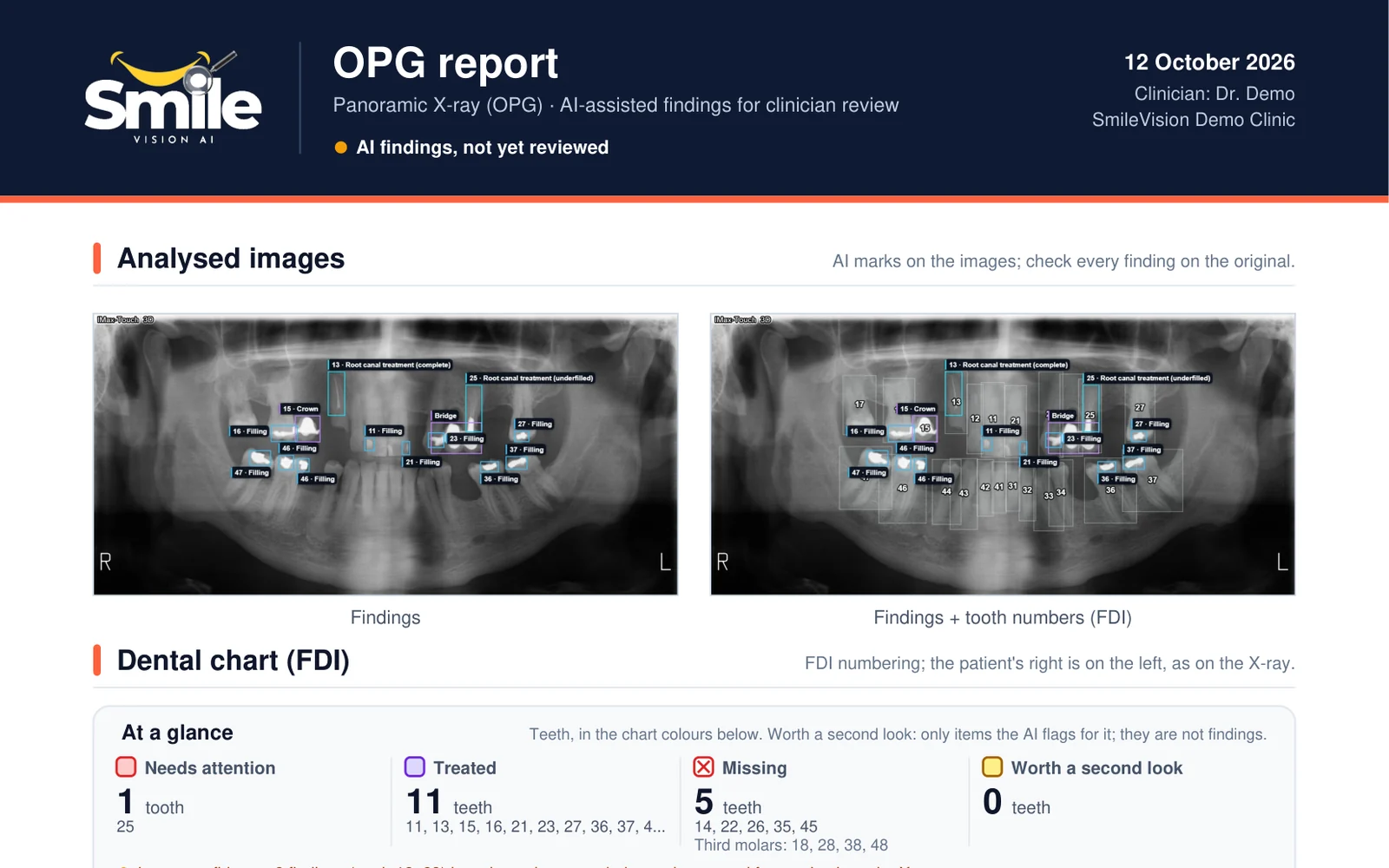
    OPG PDF report with the annotated film and dental chart
    04

    OPG PDF report

    A clean PDF with the annotated film and the dental chart, ready to share.

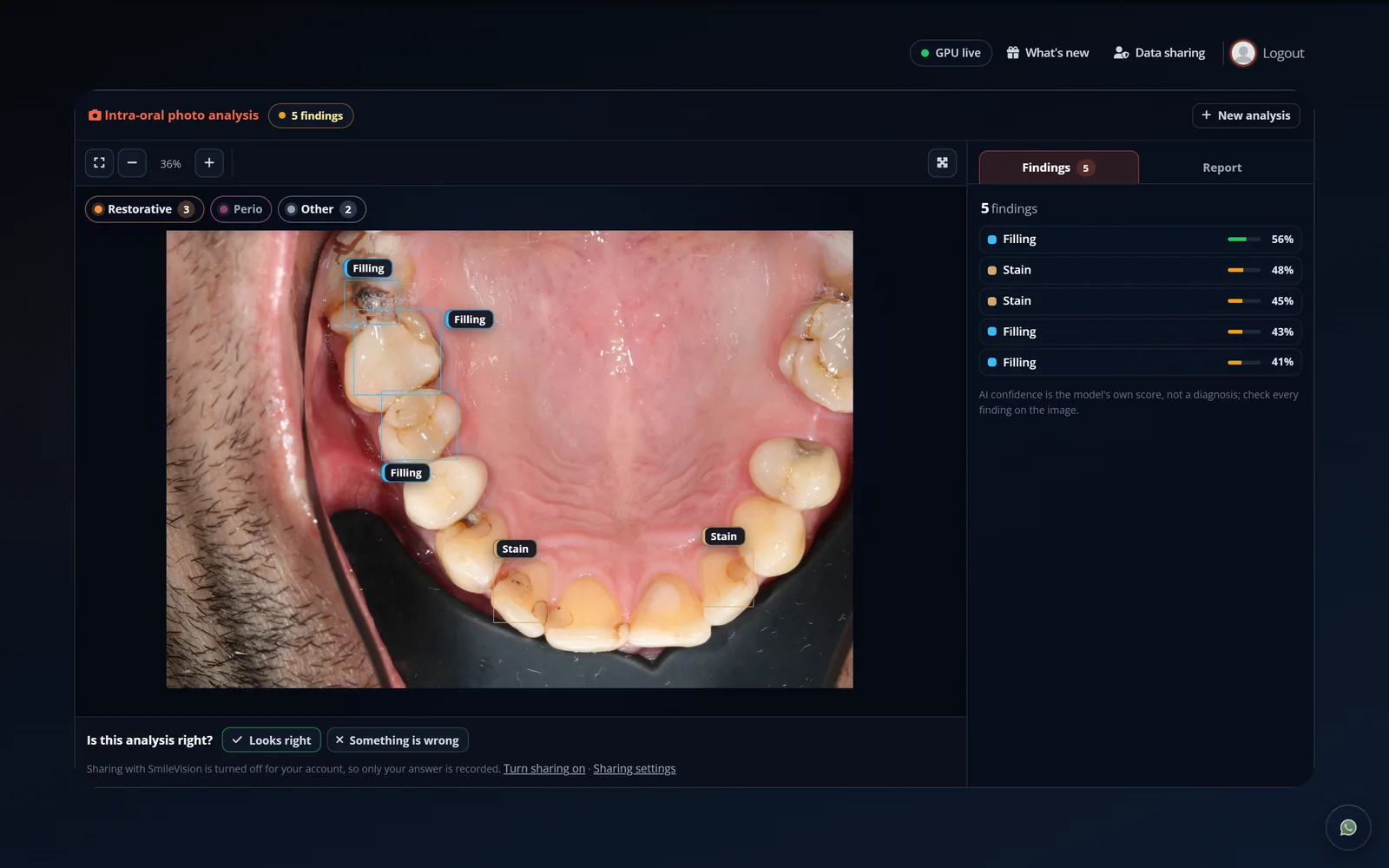
    Intra-oral photo analysis screen
    05

    Intra-oral photo AI

    Fillings and stain marked on the photo, ready to show your patient.

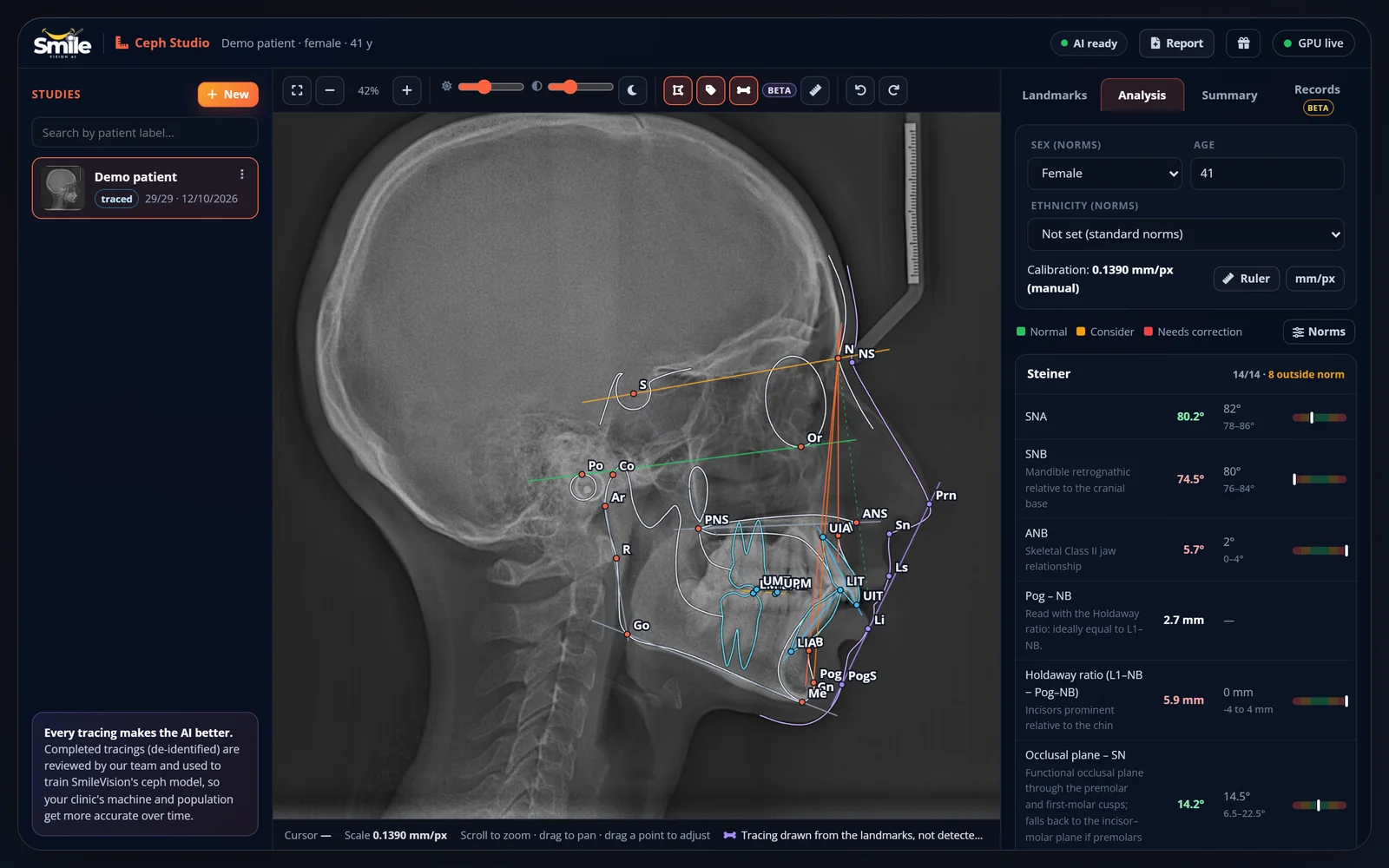
    Ceph Studio with AI landmarks, tracing and Steiner values
    06

    Ceph Studio

    29 AI landmarks, anatomical tracing and Steiner values that update as you drag.

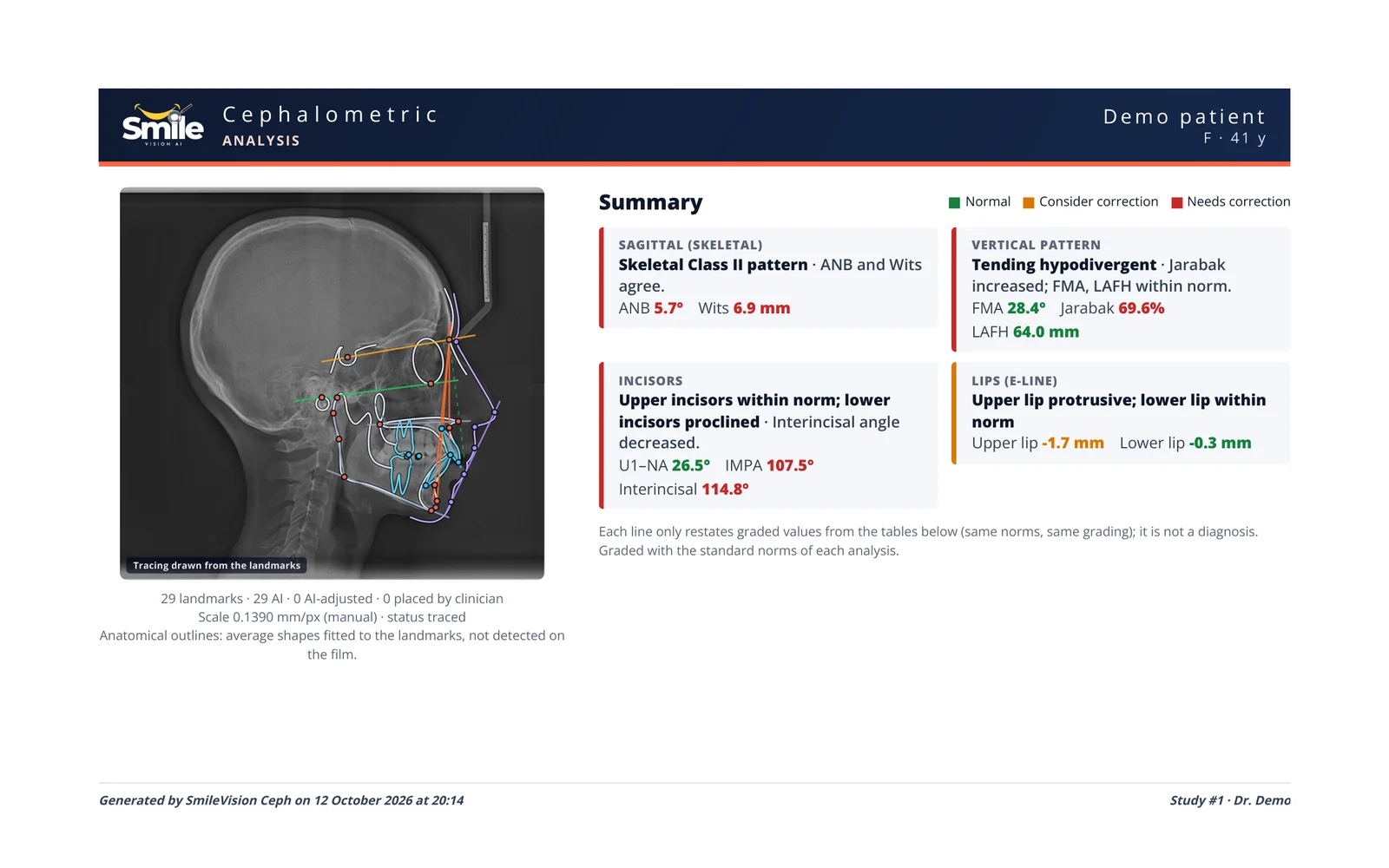
    One-page Steiner and Downs ceph report
    07

    Ceph one-pager

    Clinic format: traced film on the left, colour-coded Steiner and Downs tables on the right.

    CBCT Studio with 3D segmentation and MPR slices
    08

    CBCT Studio

    3D segmentation beside axial, coronal and sagittal slices.

    CBCT Studio measuring distance from teeth to the nerve canal
    09

    Nerve-canal proximity

    Distance from the lower teeth to the mandibular canal, measured in 3D.

    08 Always learning

    Sharper every night.

    Every correction you make, with your consent and de-identified, becomes a lesson. New models train overnight, sit an exam on a frozen test set they have never seen, and ship only if they beat the model you're using. Then the loop starts again.

    Example: our latest ceph release

    1.04→1.00mm mean landmark error

    Released only after beating the previous model on held-out films. Nothing ships on a hunch.

    You reviewLooks right, or correct it
    It learnsOpt-in, de-identified
    Overnight trainingOn our own GPUs
    Frozen-test gateMust beat the live model
    Morning releaseEveryone gets it
    LoopCorrect → Learn → Ship

    09 Founders

    A clinician and an engineer. Equal parts.

    SmileVision was built at the chair and at the keyboard at the same time. One founder decides what a clinician needs to see; the other makes the machine see it.

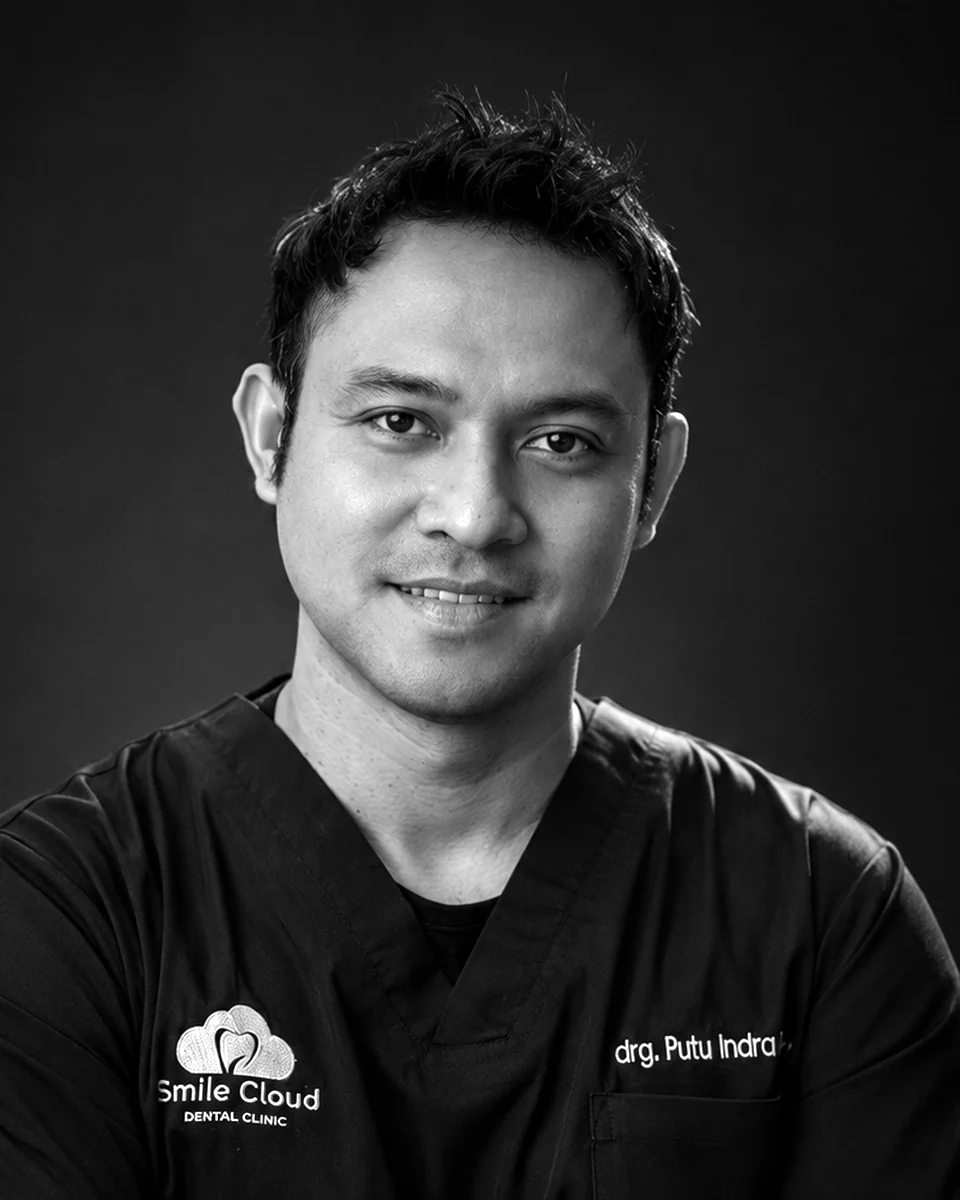
    Portrait of Zauraiz AlamgeerCo-founder · Technology

    Zauraiz Alamgeer

    AI & engineering

    Zauraiz leads SmileVision's AI and engineering. He holds an M.Phil in Engineering specialising in artificial intelligence and an honours degree in Mechatronics. He has spent a decade shipping AI, web and blockchain products, from peer-reviewed computer-vision research at MIMOS Berhad in Kuala Lumpur to AI for dental communication platforms and the CTO seat at Vitalum. At SmileVision he builds the models, the overnight training loop and the platform around them.

    Portrait of drg. Putu Indra, Sp.OrtCo-founder · Clinical

    drg. Putu Indra, Sp.Ort

    Specialist orthodontist

    Dr Putu completed his orthodontic specialist training at Universitas Airlangga in 2016. He practises in Surabaya at D-Arts Dental Clinic and is a clinical advisor to Smile Cloud Dental Clinic, focusing on temporary anchorage devices, clear aligners and digitally planned, predictable treatment. He has presented case studies at an Asia-Pacific orthodontic specialist forum. At SmileVision he sets the clinical bar, from report formats clinicians actually use to reviewing what the AI gets right and wrong.

    10 Pricing

    One plan. Every studio. Fifteen dollars.

    No demo call before you see a price, and no tiers to decode. You get the whole platform, and every model we ship after you join.

    SmileVision · All studios
    $15/ month
    USD
    • OPG & bitewing AI with PDF reports
    • Intra-oral photo AI
    • Ceph Studio, one-page reports & ortho records
    • CBCT Studio with STL / PLY export
    • Smile Studio with smile reports
    • Novel Crown & Fusion Studio Beta
    • Every new model as it ships
    Start now →

    Prices in USD; local taxes may apply. Already a member? Log in

    Questions, answered.

    Does SmileVision make the diagnosis?

    No. SmileVision is decision support. It points out what it sees and shows where, and you confirm, correct or dismiss every finding. The clinical decision always stays with the clinician.

    Which images can I upload?

    Panoramic, bitewing and intra-oral images as JPG, PNG or BMP up to 30 MB. Cephalograms also as TIFF or DICOM. CBCT as a zipped DICOM series. Smile photos as JPG, PNG, WebP or HEIC, and intra-oral scans for Novel Crown as STL, PLY or OBJ.

    What do I get back?

    Annotated images, an FDI tooth chart, PDF reports, a one-page Steiner and Downs ceph report, ortho records reports, a one-page smile report with the before-and-after, STL files for Novel Crown, STL or PLY from CBCT Studio, and one master report per patient from Fusion Studio.

    Is my patients' data used to train the AI?

    Only if you opt in. When you share an image to help improve the AI, patient names, IDs and file details are removed, and printed text on X-rays is blurred during review. You can stop sharing for your clinic at any time.

    How accurate is it?

    We measure every model on held-out images it has never seen, and publish a new one only when it beats the current model. For example, our ceph AI's mean landmark error is about 1 mm on held-out films. AI can be wrong, which is why every result is shown with its evidence and stays editable.

    Who is behind SmileVision?

    Two co-founders: Zauraiz Alamgeer, an AI engineer, and drg. Putu Indra, Sp.Ort, a specialist orthodontist. Clinical feedback from practising dentists shapes every release.

    Give every scan a second pair of eyes.

    Start for $15 / month →